
A clickable prototype can prove that a user interaction is understandable, but it rarely proves that the work behind it can run reliably. Production software needs explicit rules for authoritative data, ownership, permissions, status changes, handoffs, and recovery when inputs are missing, late, duplicated, or wrong. The screens show the happy path. The operating path determines the real scope.
That is why a client portal or approval flow can look nearly finished in a demo, then expand once development begins. The prototype is not misleading. It is doing its job by making a concept visible. The surprise comes when the team must answer what happens when real work does not follow the demo.
Why does a simple prototype become expensive to build?
A simple prototype becomes expensive when a polished screen sequence is mistaken for a complete production workflow. In a demo, every form is filled correctly, the right person responds promptly, and the system always has the information it needs. In production, a request may arrive twice, a manager may be unavailable, or two systems may disagree about the customer record.
The distinction is useful in planning conversations:
- Prototype: intended screens, clean inputs, successful actions, and assumed roles
- Production workflow: a source of truth, valid states, permissions, integrations, audit needs, and recoverable failures
Polished visuals can validate desirability and usability. They do not automatically define delivery scope. A useful application helps someone complete or review a real task under normal variation, not only take a successful tour through it.
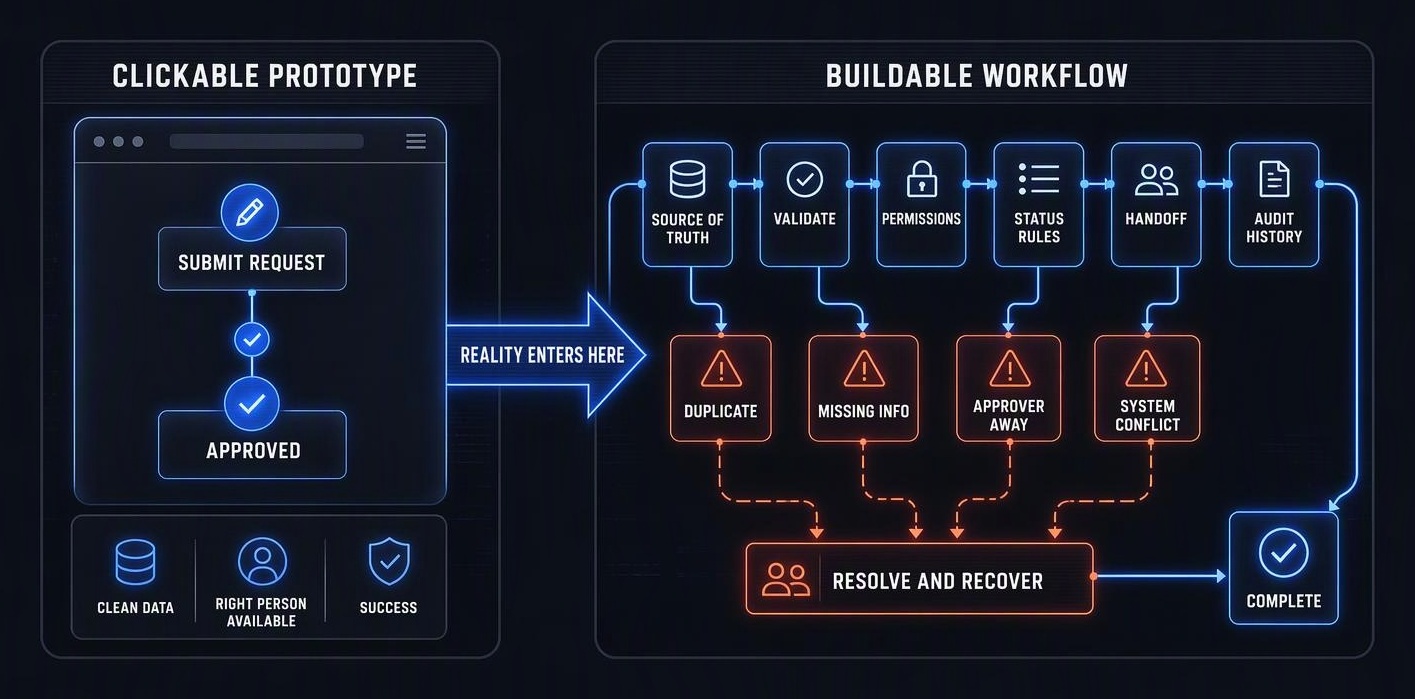
Which invisible workflow rules determine the real software scope?
The real software scope is determined by the operating decisions a prototype usually leaves unstated. A development team needs to know where each record originates and which system has the final say when records conflict. It also needs to know who may create, edit, approve, override, or close that record.
A practical checklist includes:
- Data ownership: Which system is authoritative for each piece of information?
- States and transitions: What does each status mean, and who is allowed to move work from one status to another?
- Handoffs: How does the next person or system know that work is ready?
- Permissions and history: Who can make consequential changes, and what record of those changes is needed?
- Exceptions and recovery: What happens to missing, duplicate, late, or incorrect inputs, and who resolves them?
Consider an Approve button. It looks like one action, but it may require approval thresholds, delegation when the approver is absent, notifications, reversal rules, and an audit trail. None of those decisions are decoration around the feature. They are part of the product.
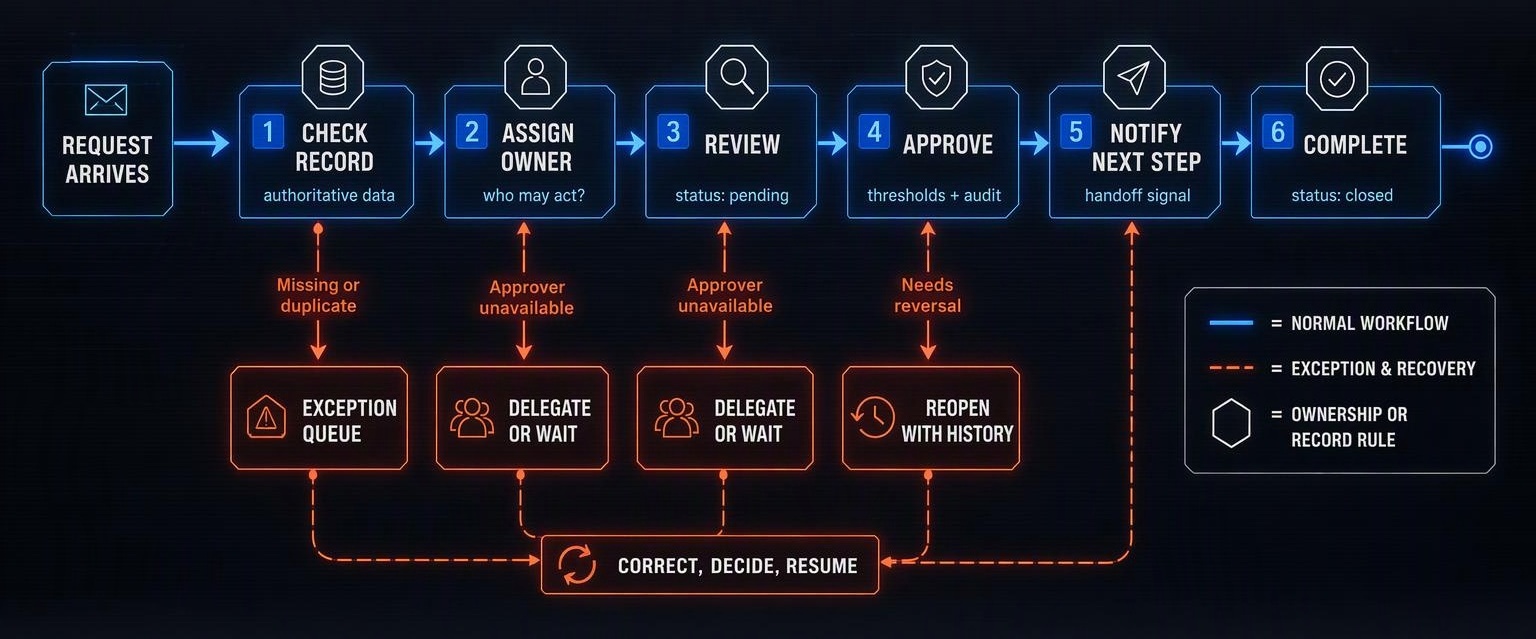
How should discovery turn a prototype into a buildable roadmap?
Discovery should follow the highest-value journey from its trigger to its completed outcome. Trace the people, systems, records, decisions, state changes, and handoffs involved. Then walk through the ordinary awkward cases, not only the ideal one.
Ask three direct questions at every step: Who owns this step? What happens when it fails? How does the next person or system know it is ready? The answers expose whether an exception needs automation, a review queue, a notification, or a manual fallback.
Not every exception belongs in a first release. But each one needs an explicit operating decision. The aim is a limited version that finishes a real job, rather than a polished collection of screens that sends users back to email and spreadsheets halfway through.
Scope becomes honest when the workflow can survive reality
A prototype remains valuable evidence that a concept is understandable. It is not a complete roadmap by default. Before treating interaction design as an implementation estimate, confirm ownership, authoritative information, state rules, exception handling, and recovery.
The question becomes not whether the screens are finished, but whether the team can describe how the work finishes reliably. Success is not the feature. It is the completed task, even when the day is messy.